How to Check Your Laptop Specs for Gaming on Windows
Before you download a game, check three things on your laptop: the processor, the graphics chip, and the installed memory. Windows Task Manager shows all three. Here’s where to look, using Gamnivo’s Intel Iris Xe laptop as a worked example.
1. Find your processor and graphics chip
Press Ctrl + Shift + Esc to open Task Manager. Select Performance, then CPU. The full processor name appears above the graph. On our laptop, it reads Intel Core i5-1135G7. Copy the full model number so you can compare it with a game’s requirements.
Next, select GPU 0. Look above the graph for the graphics chip’s full name. Our laptop shows Intel Iris Xe. If your laptop also lists GPU 1, open it and record that name too.

2. Check how much RAM is installed
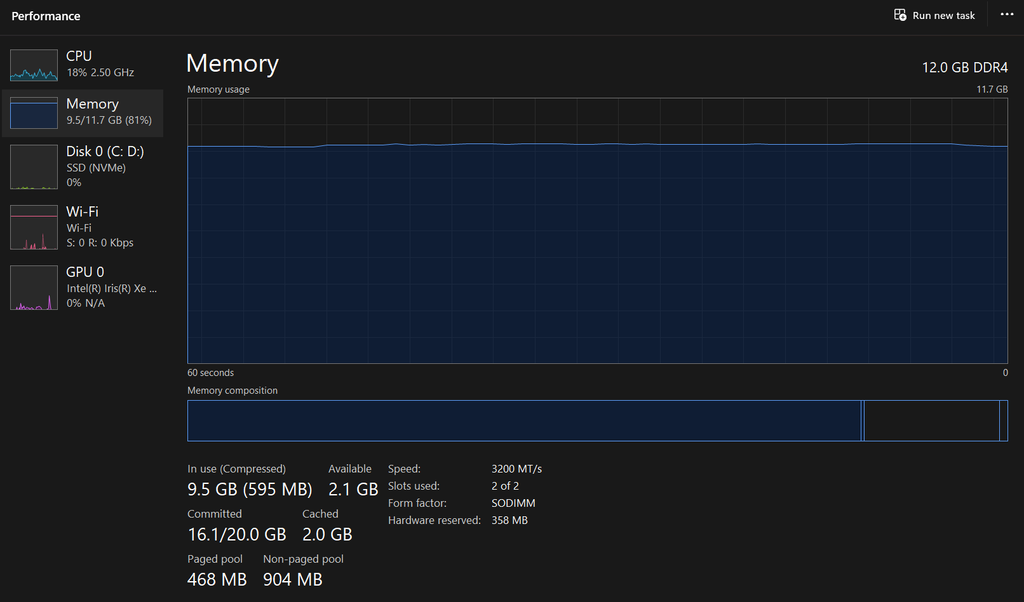
Under Performance, select Memory. Read the capacity in the top-right corner. On our laptop, it says 12.0 GB DDR4. That is the figure to record as installed RAM.
The sidebar in our screenshot reads 9.5/11.7 GB (81%). At that moment, 9.5 GB was in use out of 11.7 GB usable. Windows also reports 358 MB reserved for hardware. When a game lists a memory requirement, start with the installed capacity. The percentage changes as you open and close apps.
3. Compare your laptop with the game’s requirements
Open the game’s official store page and find System Requirements. Compare the processor, graphics, and memory lines separately. For example, if a game asks for 8 GB of RAM, our 12 GB laptop clears the memory requirement. The next question is whether its Intel Iris Xe graphics can handle the game at the resolution and settings you want.
If the store page names a graphics card and you’re unsure how your chip compares, look for a performance test that identifies your GPU, the game version, the resolution, and the settings used. Those details make a frame-rate result more useful when deciding whether to download the game.
Check the operating system and available storage listed on the store page too. To see free space in Windows, open File Explorer → This PC and check the drive where you plan to install the game.
Our example laptop at a glance
- CPU: Intel Core i5-1135G7
- GPU: Intel Iris Xe
- Installed RAM: 12 GB DDR4
- Storage type: NVMe SSD
You can find the full hardware profile and our approach to game comparisons on How We Test.